Standard Operating Procedure (SOP-01): Quarantined Cards Queue & Account Claims
Document Control:
* SOP Code: CPL-SOP-GOV-001
* Publisher: CPL Real Rewards Team
* Technical Maintenance: Systems Developer
* Effective Date: October 2026
* Target Audience: Store Cashiers, Store Supervisors, Head Office Checkers, Internal Audit
* Applicable Environments: Staging & Production
* Document Status: Production Approved
1. Purpose & Business Objective
To establish a standard operating procedure for handling physical loyalty cards scanned at point-of-sale (POS) registers that do not match registered member profiles in the Golden Record registry.
This procedure ensures that:
1. Valid customers never lose earned points from unregistered or new card scans.
2. The core customer registry (res.partner) is never polluted with fake or dummy placeholder accounts.
3. Points claims are governed under strict Maker-Checker dual control.
2. Operational Baseline & Scope
| Metric | Verified Value | System Significance |
|---|---|---|
| Quarantined Transaction Lines | 15,798 | Individual POS till sales lines recorded against unknown card numbers. |
| Distinct Unknown Physical Cards | 2,455 | Unique card barcodes scanned without active customer registration. |
| Uncaptured Loyalty Points | 194,520 | Accrued points held in escrow pending customer proof of ownership. |
| Total Transacted Spend | K618,127.06 | Gross purchase volume generated by quarantined card scans. |
| Till Redeemable Points | 0 Pts |
Quarantined cards cannot redeem points until claimed and verified. |
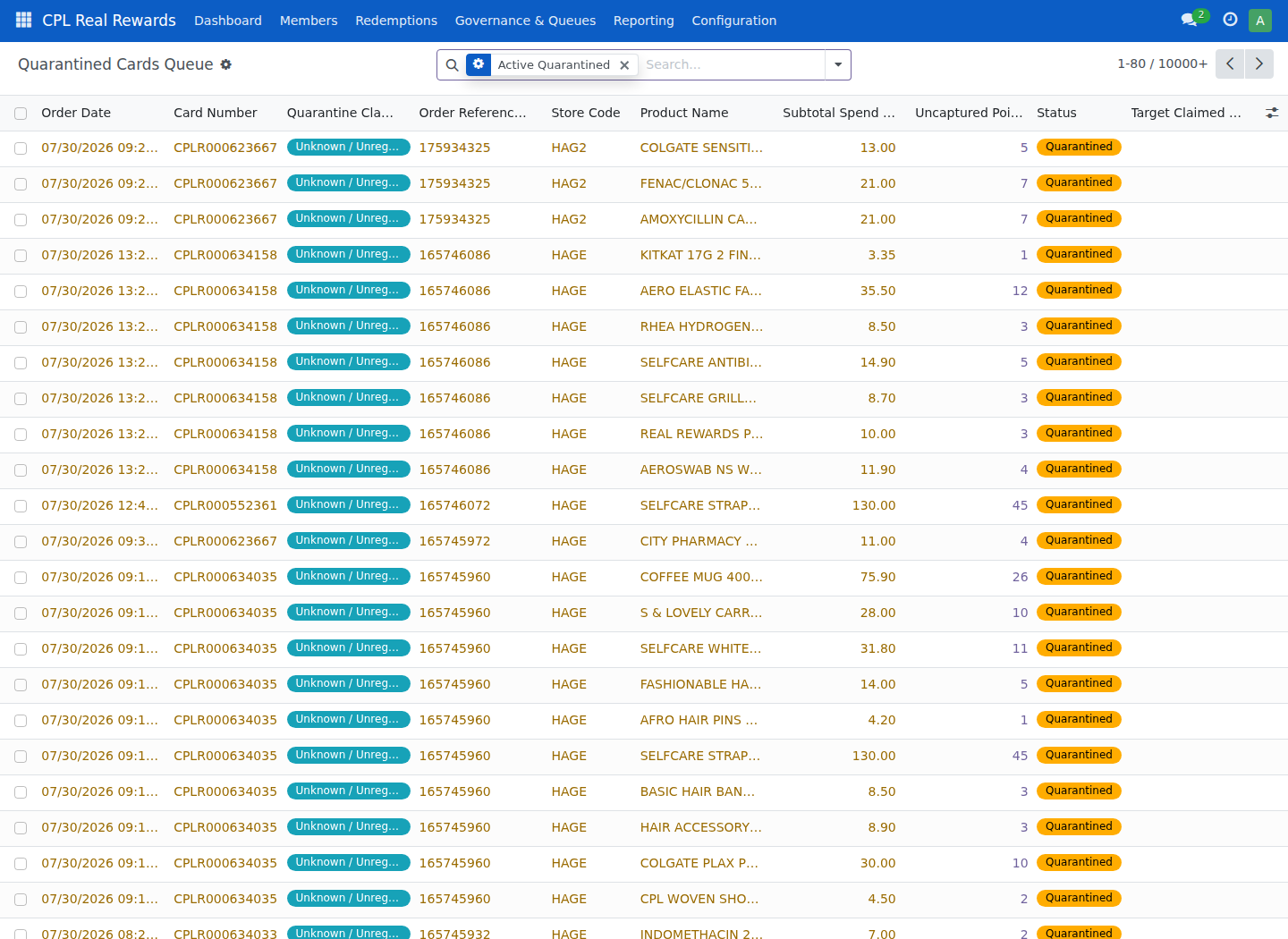 Figure 1: Quarantined Cards Queue list view showing badges, POS order refs, store codes, spend, and points.
3. End-to-End Account Claim Workflow
sequenceDiagram
    autonumber
    actor Customer
    actor Maker as Branch Staff (Maker)
    actor Checker as Head Office (Checker)
    participant Queue as Quarantined Cards Queue
    participant Golden as Member Golden Record
    participant Ledger as Loyalty Ledger

    Customer->>Maker: Presents Till Receipts & Loyalty Card
    Maker->>Queue: Searches Card Number or Order Reference
    Maker->>Maker: Verifies Store Code, Date & Spend Match Receipt
    Maker->>Queue: Clicks "Push to Member (Claim)"
    Maker->>Queue: Selects Verified Golden Record Profile & Attaches Proof
    Queue-->>Checker: Generates Change Request in "Submitted" Status
    Checker->>Checker: Inspects Receipt Copy & Approves Request
    Checker->>Golden: Points Credited to Member Profile
    Checker->>Ledger: Creates Line-Item Audit Ledger Entries
    Checker->>Queue: Updates Quarantine State to "Claimed"
    Checker-->>Customer: Customer Receives SMS Notification of Point Credit
4. Step-by-Step Operating Instructions
Step 1: Physical Receipt Verification (Store Cashier / Store Supervisor)
- The store cashier or Store Supervisor requests the customer's original cash register receipts.
- Verify the following three matching criteria:
- Date & Timestamp: Within the recorded transaction window.
- Store Code: Matching retail location (e.g.
CP Waigani Central,HAGE, etc.). - Purchase Total: Exact PGK spend matching the till receipt.
Step 2: Initiating Claim Wizard (Store Maker / Store Supervisor)
- Navigate to Governance & Queues > Quarantined Cards Queue.
- Search by
Card NumberorOrder Reference. - Open the quarantined transaction line.
- Click Push to Member (Claim) in the top action bar.
- In the claim modal:
- Target Member: Select the customer's verified active Golden Record Profile.
- Claim ALL transactions for this card: Select if the customer owns all historical scans on that card.
- Claim Reason / Receipt Proof: Type: "Receipt #165746086, CP Waigani Central, 30-Jul-2026. Verified with customer photo ID."
- Click Confirm Claim & Transfer Points.
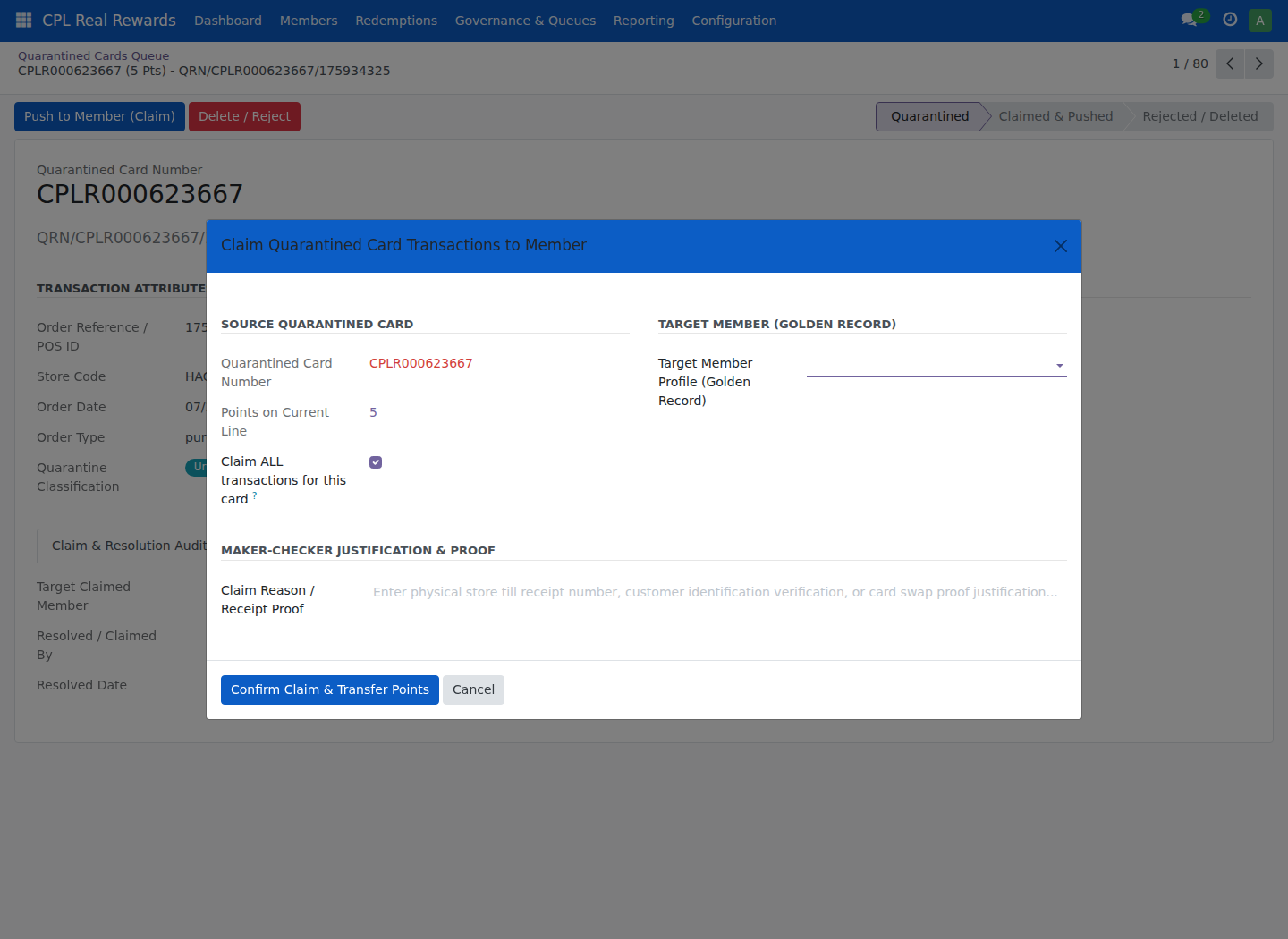 Figure 2: Claim wizard connecting quarantined lines to active Golden Records.
Step 3: Dual-Control Audit Approval (Head Office Checker)
- Head Office Checker opens Members > Member Add/Change Requests.
- Open the pending request.
- Review the uploaded receipt photo and verify customer Golden Record status.
- Click Approve.
- The points atomically transfer to the member's loyalty ledger balance, and the quarantine records transition to
claimed.
Step 4: Clarification & Resubmission Governance (STG-TICK-043)
If supporting receipts are unreadable or further proof is needed: 1. Head Office Checkers click Send Back for Correction with a specific question in the chatter (e.g. asking for clearer till receipt photo). 2. The Store Maker or Supervisor uploads the revised evidence directly to the same record and clicks Submit for Approval. 3. Duplicate claim forms are strictly prohibited to avoid double-crediting escrowed points.