CPL Real Rewards Odoo 17 — Odoo Administrator Operating Manual
Document Control:
* Owner & Publisher: CPL Real Rewards Team
* Technical Maintenance: Systems Developer
* Target Audience: Business Loyalty Administrators, Retail Category Managers, Store Managers
* Applicable Environments: Staging (https://angry-mad-smile.cpl.com.pg) & Production (https://rewards.cpl.com.pg)
* Standard Version: v2.9.0
* Effective Date: October 2026
* Document Status: Production Certified & Verified
Document Control Log
| Revision | Date | Operational Author / Reviewer | Description of Operational Updates |
|---|---|---|---|
| v1.0 | 2026-08-15 | Real Rewards Operations | Initial administrative runbook for catalog and member configuration. |
| v2.0 | 2026-09-20 | Real Rewards Operations | Added Member Tags management, CSV import wizard, and export workflows. |
| v2.5 | 2026-10-02 | Real Rewards Operations | Added Quarantined Cards Queue governance and Maker-Checker escalation paths. |
| v2.7 | 2026-10-04 | Real Rewards Operations | Deployed 5-Tab Navigation Layout, Executive Dashboard dynamic KPI SQL engine, and Blocked Cards governance. |
| v2.8 | 2026-10-07 | Real Rewards Operations | Added Section 5: Pronto 10-Digit SO Range Schema Configuration (up to 9,999,999,999) and Admin Return & Refund Protocol (STG-TICK-040 / STG-TICK-041). |
| v2.9.0 | 2026-10-07 | Real Rewards Operations | Documented Member Service Request Amendment & Resubmission Lifecycle (STG-TICK-043), Odoo Discuss ChannelSelector search (STG-TICK-042), and formalized Real-Time Daily Issue Flagging Protocol. |
1. Executive Dashboard & Dynamic KPI Engine
The Executive Dashboard provides real-time financial liability, customer engagement, and transaction volume metrics across the retail network:
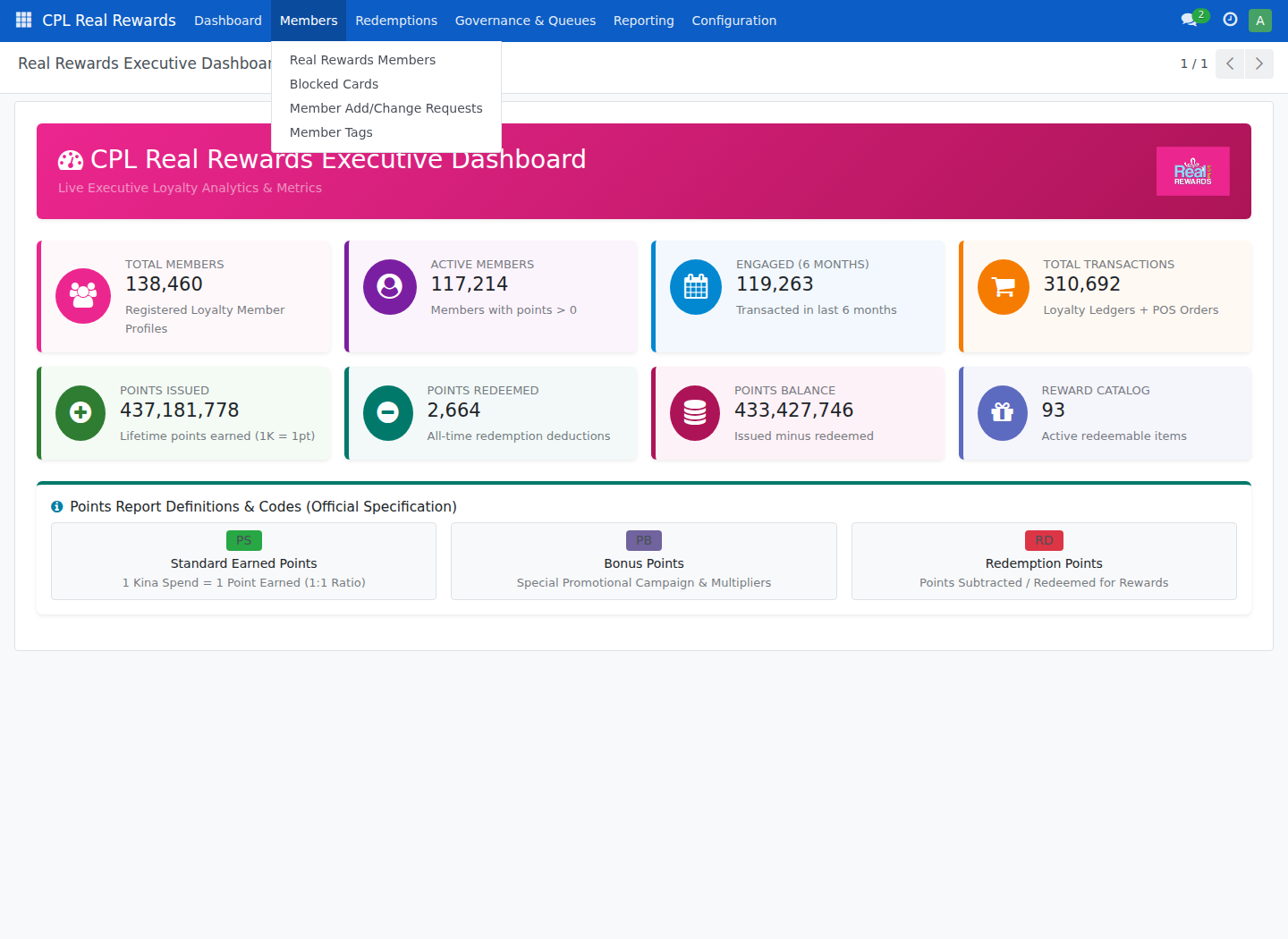 Figure 1: Executive Dashboard with live KPI counters, member cohorts, and financial liability summaries.
Live Metrics & Data Sources:
- Total Members (138,460): Active Golden Records registered in
res.partner. - Active Transacting Members (117,214): Members with points $> 0$.
- Engaged Members - 6 Months (119,263): Members with recorded transactions in the last 180 days.
- Total Transactions (310,692): Combined count of historical loyalty ledgers and live POS orders.
- Points Issued (437,181,778): Cumulative lifetime points issued at K1 = 1 Point.
- Points Redeemed (2,664): Points deducted for reward vouchers and catalog merchandise.
- Points Balance (433,427,746): Live redeemable financial liability.
- Reward Catalog Items (93): Active loyalty products in the master catalog.
2. Member Tags Master (res.partner.category)
Loyalty Administrators manage campaign member cohorts and VIP classifications:
- Navigate to Members > Member Tags.
- Click New to create a tag (e.g.
CPL STAFF,2025 MOTHERS DAY WINNERS,HIGH VALUE VIP). - Assign a custom badge color for clear visual differentiation.
- Batch Assignment: Filter members in Real Rewards Members, select multiple records, and use the Action > Add Tags dropdown.
3. Rewards Catalog Management
To update product redemption point tiers:
- Navigate to Redemptions > Rewards Catalog Master.
- Administrators can add or edit eligible loyalty reward products:
- Product Name: Display title (e.g. K50 CPL Shopping Voucher).
- Points Required: Mandatory point cost (e.g.
5000 Pts). - Active: Toggle availability for store redemption.
- Once published, products immediately appear in the till redemption lookup dialog across all branches.
4. Reporting & Daily Points Accounting
To reconcile daily loyalty balances and export accounting entries:
- Navigate to Reporting > Daily Points Accounting.
- Daily Aggregation: View day-by-day points earned, points redeemed, and net point liabilities grouped by store branch.
- Loyalty Ledgers: Navigate to Reporting > Loyalty Ledgers & POS Transactions for line-item audit searches with filtering by date, shop location, and transaction type.
5. In-Store Redemptions: 10-Digit SO Sequences & Admin Return/Refund Governance
Administrators manage store sales order number boundaries and authorize customer returns or erroneous order reversals:
5.1 Pronto Sales Order Range Management (real.rewards.shop.so.range):
- Modern Pronto POS till registers issue 10-digit transaction numbers exceeding 1,000,000,000 (e.g.
1065180689). - Under STG-TICK-040, all retail branches are configured with 64-bit BigInt boundaries spanning
1to9,999,999,999. - Administrators can review or update store sequence ranges via Configuration > Shop SO Ranges.
5.2 Executing Customer Returns & Keying Error Refunds:
When an item is returned at a store branch or an incorrect product line was entered by a cashier (e.g. Lotion instead of Toothpaste):
- Navigate to Redemptions > Store Redemptions.
- Locate and open the order in
Redemption Completedstatus. - Review the transaction details and enter a descriptive explanation into Cancellation Reason.
- Click the red Cancel / Return & Refund button in the header.
- In the confirmation dialog, click Ok.
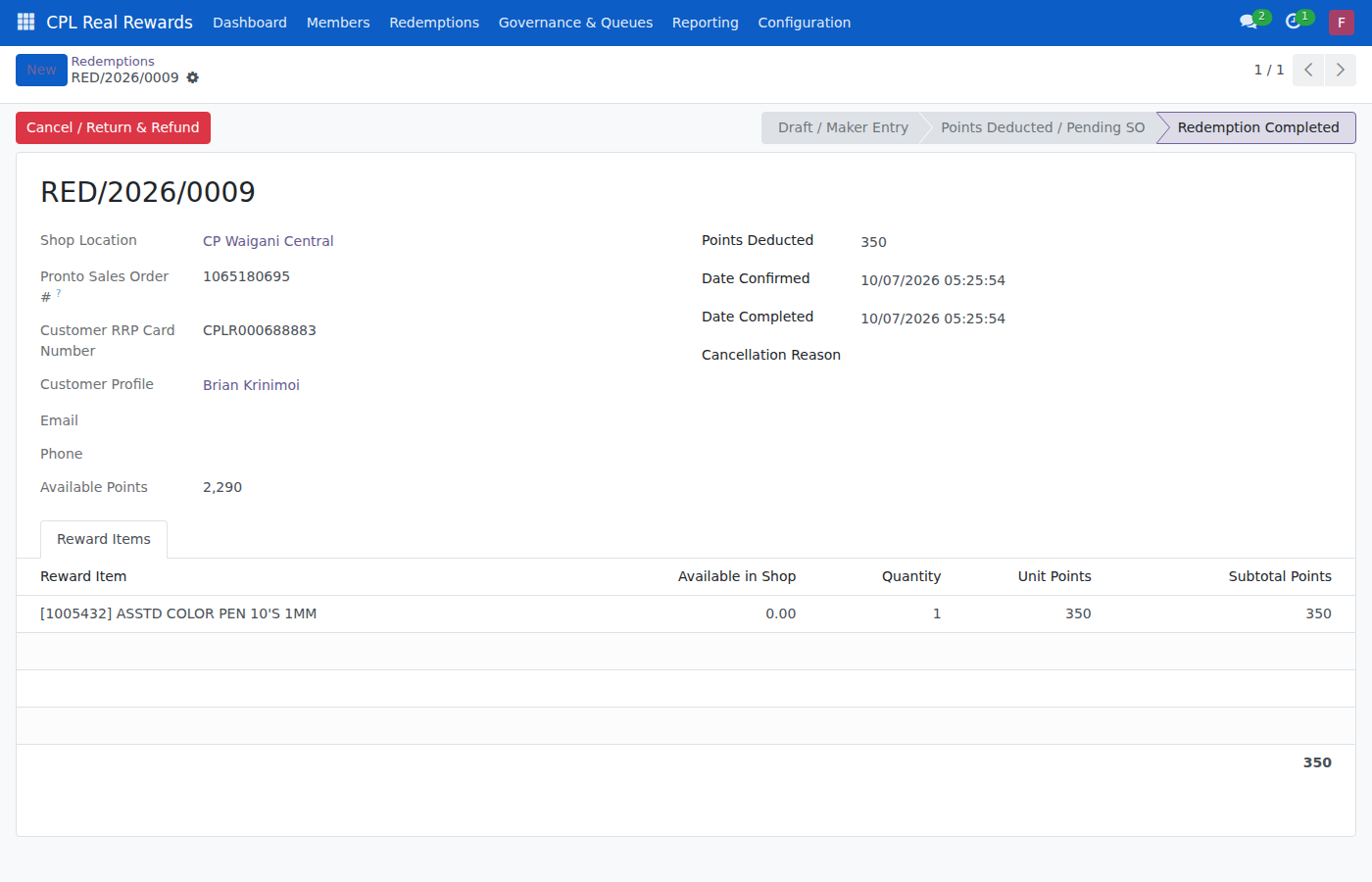 Figure 2: Admin view of completed redemption order with active Cancel / Return & Refund header action.
5.3 Technical & Financial Impact:
- Zero Data Loss: The order is never deleted or unlinked.
- Audit Lineage: The Pronto SO is automatically renamed to
{SO}-REFUNDED, maintaining physical receipt linkage. - Immediate Balance Restoration: A compensatory
+Pointsearn credit is posted to the loyalty ledger, immediately restoring the customer's spendable points (bypassing the 7-day earn clearance window). - Corrected Item Re-issuance: The cashier can now process a new redemption order for the customer's correct item.
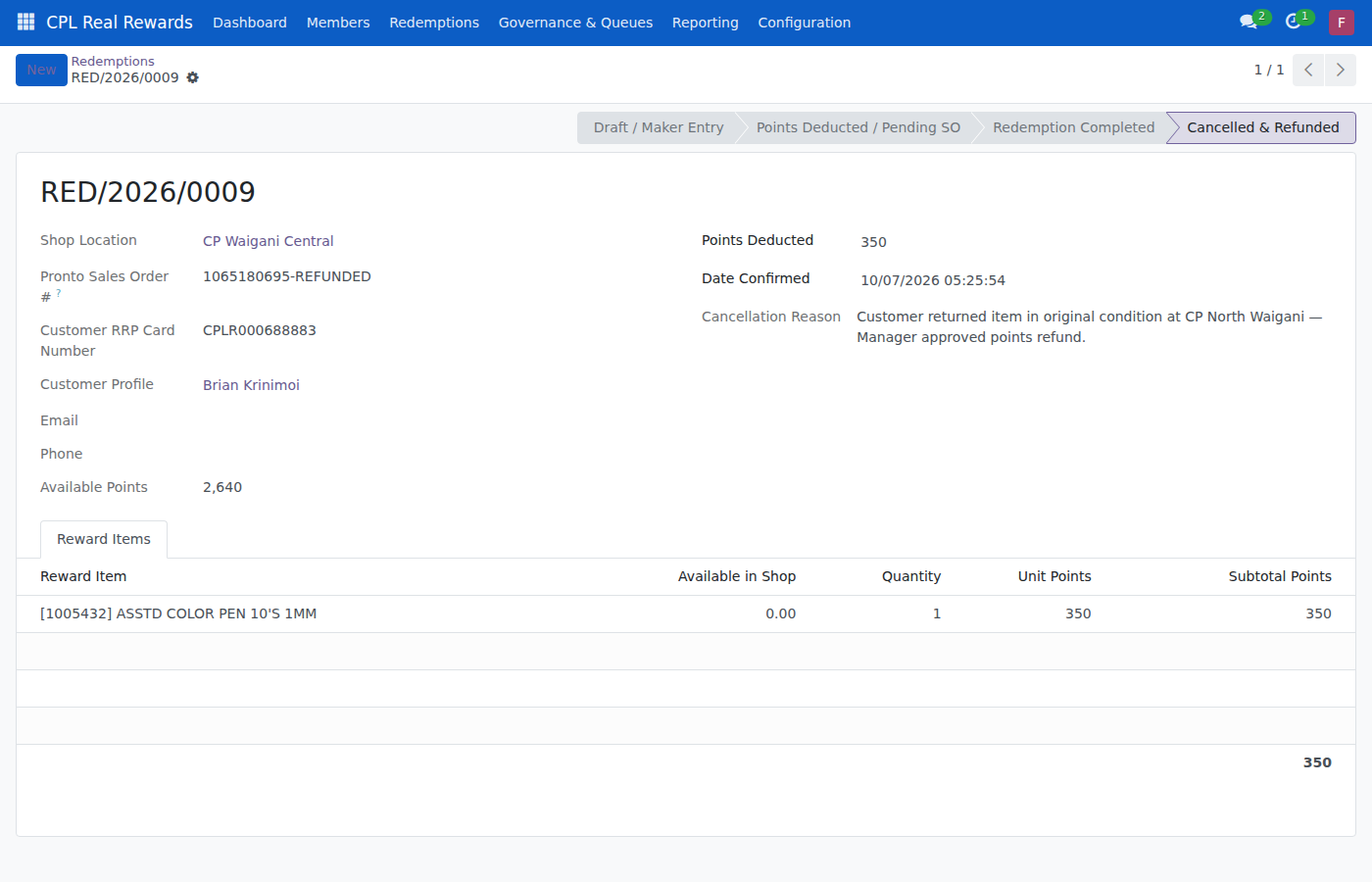 Figure 3: Order marked Cancelled & Refunded with decoupled Pronto SO and restored member balance.
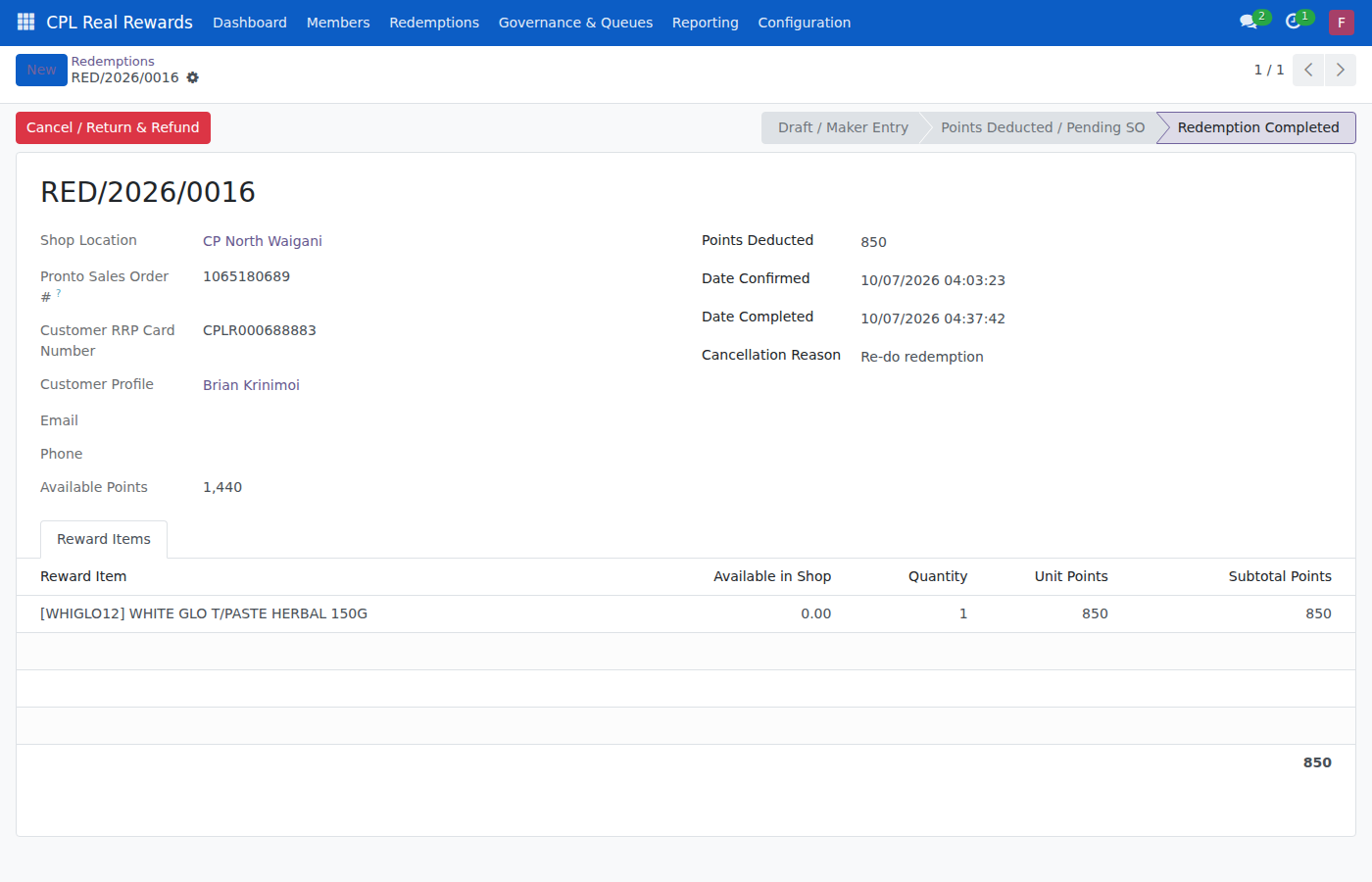 Figure 4: Production order RED/2026/0016 verified with single White Glo Toothpaste line (850 Pts) and Pronto SO 1065180689 intact.